Posts

You: The Video Game - A Back to School Icebreaker & Community Builder

Image
As an introvert, I'm not a giant fan of icebreaker/get to know you activities that require awkward conversations with people you don't know. I'm not the only one - plenty of students feel the same way! Last year I came up with a beginning of school activity that introduces content, allows me to learn about each student, and begins to establish classroom community connections— AND it's cringe free! :) Our kids really enjoy this activity - there's lots of opportunity to be creative and it's culturally relevant with its video game tie-in. No Cringe Icebreakers In this activity, You: The Video Game , students share the things that make them unique and learn about their classmates' lives, but there's no uncomfortable conversations. Instead, students pretend their lives have been turned into a video game. They create a "screenshot" of their imaginary video game that includes 10 symbols, and write a bit of text to explain the meaning behind each symbo...

Designing Genre Signs with Photos in Canva

Image
  I recently spent two weeks with a colleague that works at the elementary level. She'd just completed the most amazing project, organizing her nonfiction books into easily browsable genres. I love creating graphics, so with her input, I designed shelf labels and signs for 78 different nonfiction genres and 11 fiction genres.  If you'd like to purchase these genre labels and signs, you can buy them via my Teachers Pay Teachers store. The resource includes 78 nonfiction and 11 fiction labels in two different sizes: 8.5" x 11" and 2" x 4".  For a quick crash course in creating your own labels, keep reading! The first thing you're going to need is a  Canva account , preferably a Pro account or an Education account, to ensure you have access to ALL the photographs. Remember, education accounts are FREE for K-12 teachers. With Canva open, you'll click on "Custom Size" in the upper right hand corner, and then enter your dimensions. In my examp...

Designing Watercolor Genre Signs in Canva

Image
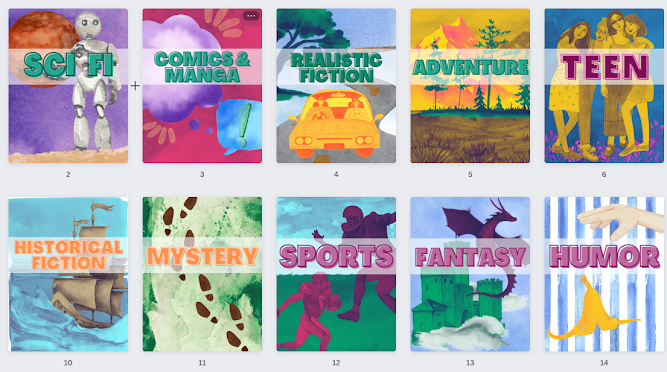
I decided this summer that it was time to overhaul my library genre signs. We have signage in place, but you can't read the labels from across the library, and they're just words - no images to support the text.  I looked for pre-made genre signs, but everything felt elementary or boring, and I was looking for something with a little more style. To meet my needs, I ended up creating a set of my own genre posters for the following 15 sections: horror, sci fi, comics & manga, realistic fiction, adventure, teen, thriller, poetry, romance, historical fiction, mystery, sports, fantasy, humor, and classics.  If you're short on time, and you want to purchase these pre-made genre signs as a printable PDF file,  they're in my TPT store.   The PDF gives you access to 15 different genres, along with a second set of signs that includes a description of the genre on each sign, for a total of 30 signs. Here's what the signs look like with added genre descriptions: I'm goi...

Ketchup Mustard & Pickle Days

Image
It's the end of the quarter, which means we like to give students time to get things submitted. Ketchup, mustard, and pickle days are one way to structure the time. It provides direction for your students that need it most, but also provides an opportunity for students in "good standing" to make choices about how they spend the period.  Update: You can download the free resource via my Teachers Pay Teacher's store .  

Using Tables to Help Writers (and Graders!)

Image
  The Brainstorm I work with some amazing English teacher colleagues. During last year's remote learning experience, I collaborated with Tonya Buda, an 9th grade teacher, to make writing a research paper as fool-proof as possible. When teaching research writing virtually, we found our lessons to be most successful when everything was in ONE tab - students got lost when they were switching back and forth between windows with a model and their own work.  To combat this, we developed a new writing template that combined all the scaffolded supports on one screen. This method utilizes a table with four columns, one devoted to each of the following: a section or component label, a model, an explanation, and then a blank column for students to type their own work. Here's a link to a table for a simple three paragraph research paper  in Google Docs. I'd strongly encourage you to make a copy of the Doc and reformat it to meet your OWN expectations and reflect the models you've d...

Virtual Relaxation Room

Image
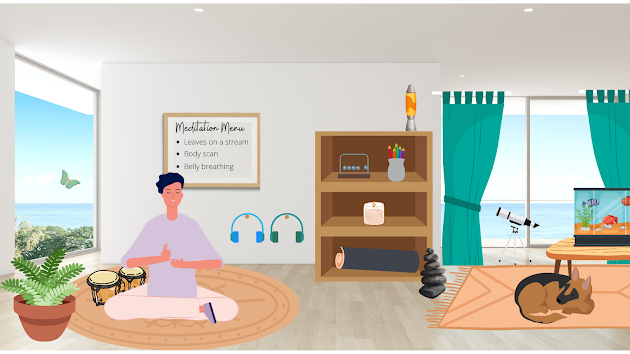
A virtual relaxation room is my 2022 version of a Bitmoji classroom. It's an interactive scene - most objects in the room are clickable links - that provide opportunities for students to de-stress and chill out. Here's my PDF version . There are MANY different digital activities you can add to a virtual relaxation room. This room, for example, links to calming music, guided meditations, a virtual lava lamp, a fish tank cam, coloring pages, cute puppies, and a set of virtual bongo drums.  Above: This is a screenshot of the virtual room - to interact with the links, you'll need to open the PDF. I really enjoyed creating this scene in Canva - there are so many options for graphics (with transparent backgrounds!) and it's easy to add links to each item, then export to a PDF.  I also wanted to share this great resource (created by Sarah Wood and participants of the Kent ISD Virtual Relaxation Room Course) for virtual relaxation ideas  - so many options!  I'm planning t...

Dicebreakers Community Building with Voice and Choice

Image
Dicebreakers activities, like the one below, are a great way to integrate student voice and student choice into community-building activities.  I designed a dice board with two rows -- students roll two dice -- they can use either number horizontally or vertically, giving them two possible questions to pick from for each turn. This gives students an element of choice. If you want to simplify, or you don't have enough dice to provide each group with two, you could always eliminate the top row, and just have 1 option for each number.  If you'd like a copy, you can access the Google Doc here . To edit, go to File --> Make a copy.