Posts

Using Tables to Help Writers (and Graders!)

Image
  The Brainstorm I work with some amazing English teacher colleagues. During last year's remote learning experience, I collaborated with Tonya Buda, an 9th grade teacher, to make writing a research paper as fool-proof as possible. When teaching research writing virtually, we found our lessons to be most successful when everything was in ONE tab - students got lost when they were switching back and forth between windows with a model and their own work.  To combat this, we developed a new writing template that combined all the scaffolded supports on one screen. This method utilizes a table with four columns, one devoted to each of the following: a section or component label, a model, an explanation, and then a blank column for students to type their own work. Here's a link to a table for a simple three paragraph research paper  in Google Docs. I'd strongly encourage you to make a copy of the Doc and reformat it to meet your OWN expectations and reflect the models you've d...
Virtual Relaxation Room

Image
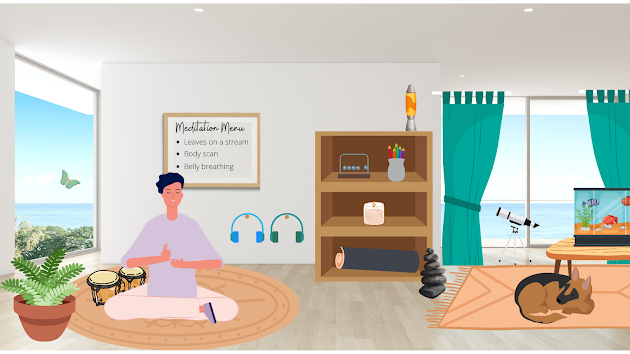
A virtual relaxation room is my 2022 version of a Bitmoji classroom. It's an interactive scene - most objects in the room are clickable links - that provide opportunities for students to de-stress and chill out. Here's my PDF version . There are MANY different digital activities you can add to a virtual relaxation room. This room, for example, links to calming music, guided meditations, a virtual lava lamp, a fish tank cam, coloring pages, cute puppies, and a set of virtual bongo drums.  Above: This is a screenshot of the virtual room - to interact with the links, you'll need to open the PDF. I really enjoyed creating this scene in Canva - there are so many options for graphics (with transparent backgrounds!) and it's easy to add links to each item, then export to a PDF.  I also wanted to share this great resource (created by Sarah Wood and participants of the Kent ISD Virtual Relaxation Room Course) for virtual relaxation ideas  - so many options!  I'm planning t...

Dicebreakers Community Building with Voice and Choice

Image
Dicebreakers activities, like the one below, are a great way to integrate student voice and student choice into community-building activities.  I designed a dice board with two rows -- students roll two dice -- they can use either number horizontally or vertically, giving them two possible questions to pick from for each turn. This gives students an element of choice. If you want to simplify, or you don't have enough dice to provide each group with two, you could always eliminate the top row, and just have 1 option for each number.  If you'd like a copy, you can access the Google Doc here . To edit, go to File --> Make a copy.

Student Voice in the Library

Image
One of my personal goals for this school year is to increase student voice in our library program. I have some great mentors in this area (Hello, Sue Kowalski!), but it's not my personal strength. I know it's super-valuable, as it provides students with a sense of ownership and increases engagement, but it's not been as high a priority as it should be.  So, for my first targeted attempt of increasing student voice this year, I built a "Your Book Picks" display. To kick things off, our library helpers all recommended their favorite books.  But I built the display so it's constantly evolving and other students can add their favorites at any time. They simply grab a "thumbs-up" tag from the jar, write their name on it, and then stick it on their favorite book, adding it to the display.  Want to create this display for yourself? Here's a link to a PDF where you can download the materials . I just printed the thumbs on cardstock and then laminated th...

Teaching Lateral Reading

Image
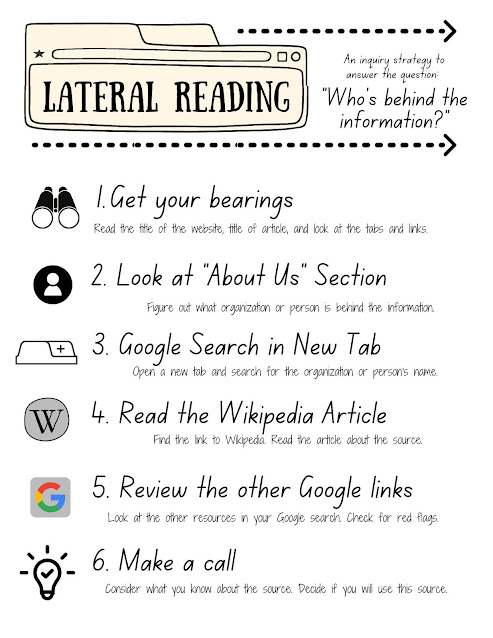
Hands down, lateral reading is my FAVORITE strategy for evaluating sources. It's concise, it's super practical, and it's accurate. It can be used for websites AND social media sources. It's also the strategy endorsed by the Stanford History Education Group (SHEG) in their Online Civic Reasoning framework. Here's a link to their collection of lessons for teaching lateral reading . There's also a Crash Course video  on YouTube introducing the skill. To apply lateral reading,  you Google the name of a source, then look at the results to see what OTHER sources have to say about your original source. It's called lateral reading because, instead of reading vertically (scrolling down the original website), you open new tabs in your browser to see what other sources say (reading laterally across your browser).  Once you spend some time with lateral reading, it becomes a really organic process, but I've found that students need distinct steps when they're fir...

Happy New Beginnings Bulletin Board

Image
This is my go-to bulletin board for January: Happy New Beginnings. It's interactive - students read the first line, guess what book it's from, then lift the flap to check their guess. Here's a list of the first lines I used, and their corresponding books: It was a pleasure to burn. (Fahrenheit 451) There is no lake at Camp Green Lake. ( Holes ) The best time to talk to ghosts is just before the sun comes up. ( Chains ) We went to the moon to have fun, but the moon turned out to completely suck. ( Feed ) The early morning sky was the color of cat vomit.  ( Imposters ) When the doorbell rings at three in the morning, it's never good news. ( Stormbreaker ) Blue Sargent had forgotten how many times she’d been told that she would kill her true love. ( The Raven Boys ) The demon exploded in a shower of ichor and guts. ( Clockwork Angel ) My mother was raised on fairy tales, but I was raised on highways. ( The Hazel Wood ) Depending on who—sorry, whom—you ask, I may have kille...

Using Discussion Cards

Image
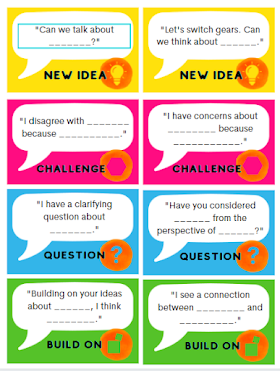
Ever noticed, during group discussions, that students are really good at sharing their opinion, but then it's a massive struggle to build the conversation from there? I've slowly discovered that we have to teach students about the RANGE of ways they can contribute to a discussion.  For example, during a conversation, participants can add to the discussion in any of these ways: Add a new idea Challenge or disagree with what's been said Ask a clarifying question Build on someone else's idea Offer evidence to support an idea or a challenge To support this, I created a "card game."  Here's what all 14 cards look like: Here are the basic rules we've used to play -- but feel free to change them up. We also let the kids play rounds where they made up their own rules - this was successful, too!  If you're looking for a video version of the rules,  watch this TikTok . Number of Players: This works best with teams of 4, but will also work with 3-5 players. M...